Time and the clock
The province's clock runs from real time to a year every second. Whatever the speed, the same day step decides who is born, falls ill, marries, works and dies, so an outcome never depends on the speed you watch it at.
Playing and pausing
The province opens paused, at dawn on its first day. Space (or the play button in the top bar) starts and stops the clock. Step pauses and moves on one simulated hour. Rewind rebuilds the province at day 0 on the same seed and basis: the same people, the same history to come.
Speeds
| Key | Speed | Simulated time a second | Mode |
|---|---|---|---|
| 1 | 1× | a second (real time) | animated |
| 2 | 10× | ten seconds | animated |
| 3 | 1 min/s | a minute (the default) | animated |
| 4 | 10 min/s | ten minutes | animated |
| 5 | 1 h/s | an hour | animated |
| 6 | 1 day/s | a day | time-lapse |
| 7 | 1 wk/s | a week | time-lapse |
| 8 | 1 mo/s | a month | time-lapse |
| 9 | 1 yr/s | a year | time-lapse |
| 0 | 30 yrs/min | half a year | time-lapse |
The field beside the speed buttons takes any rate in simulated years a minute (0.01 to 100,000), for any horizon you like. The map's corner shows the speed actually achieved: a slow machine at a fast speed may fall short of it.
Animated (up to an hour a second): people walk the roads, drive, take the bus and the Hyperline, and hold conversations you can zoom into. Time-lapse (faster): only the daily processes run, and people are shown where their plan for the day puts them. Conversations and intruders happen only in the animated day.
Setting the scene
Click the clock in the top bar. Every jump moves the clock forward, and every day in between is still simulated, in full: only the animation is skipped.
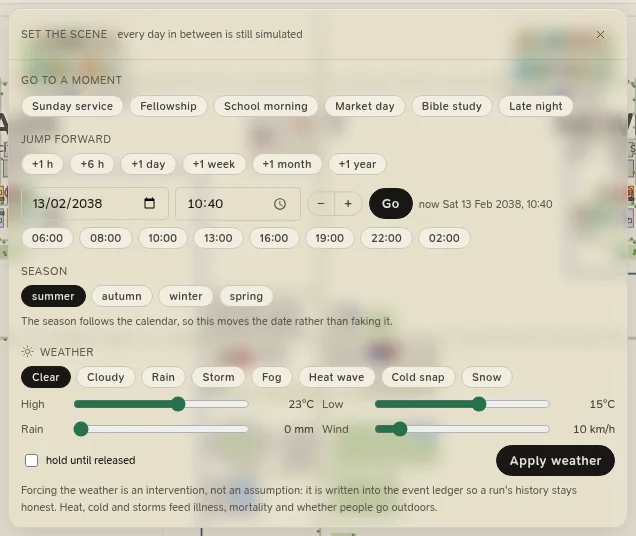
Go to a moment:
| Moment | Goes to |
|---|---|
| Sunday service | The next Sunday at 09:00, as the congregation gathers |
| Fellowship | The next Sunday at 11:05, when the congregation mingles after the service |
| School morning | The next Monday at 07:30 |
| Market day | Saturday at 10:00 |
| Bible study | Wednesday at 18:30, at the church hall |
| Late night | 01:00, when the province is asleep |
Jump forward by an hour, six hours, a day, a week, a month (30 days) or a year (365 days); or pick a date and a time and press Go. The row of times under the time field (06:00, 08:00, 10:00, 13:00, 16:00, 19:00, 22:00, 02:00) sets one in a click. A single jump goes at most three years ahead; for longer, use the time-lapse speeds.
Season moves to the first day of the next summer, autumn, winter or spring, at 09:00. The season follows the calendar and the hemisphere of the climate, so this moves the date rather than faking the season.
Time only runs forward. To go back, rewind, which rebuilds the province from the same seed.
Forcing the weather
The same panel can force the weather, so you can watch the province meet a storm, a heat wave or a cold snap without waiting for one:
- Pick a condition: Clear, Cloudy, Rain, Storm, Fog, Heat wave, Cold snap or Snow. Each loads its own figures (a heat wave is 38 °C by day and 24 °C by night, a storm 28 mm of rain in 42 km/h of wind).
- Adjust the High, Low, Rain and Wind sliders if you like.
- Tick hold until released to keep it day after day, or leave it to lapse at midnight.
- Press Apply weather. release hands the weather back to the climate model.
Forced weather is an intervention, not an assumption: it is written into the event ledger, with the figures, so a run's history says plainly where its weather came from, and the clock shows a forced badge. Heat, cold and storms feed illness and mortality, and whether people go outdoors. The season is never forced: it always follows the calendar.