The province
The province view is the simulation, live: Unity Province with every resident on the map, a clock you control, the person or place you pick in an inspector, and the analytics along the bottom. Press Ctrl+1 (or Province in the top bar) to come back to it from the workbench.
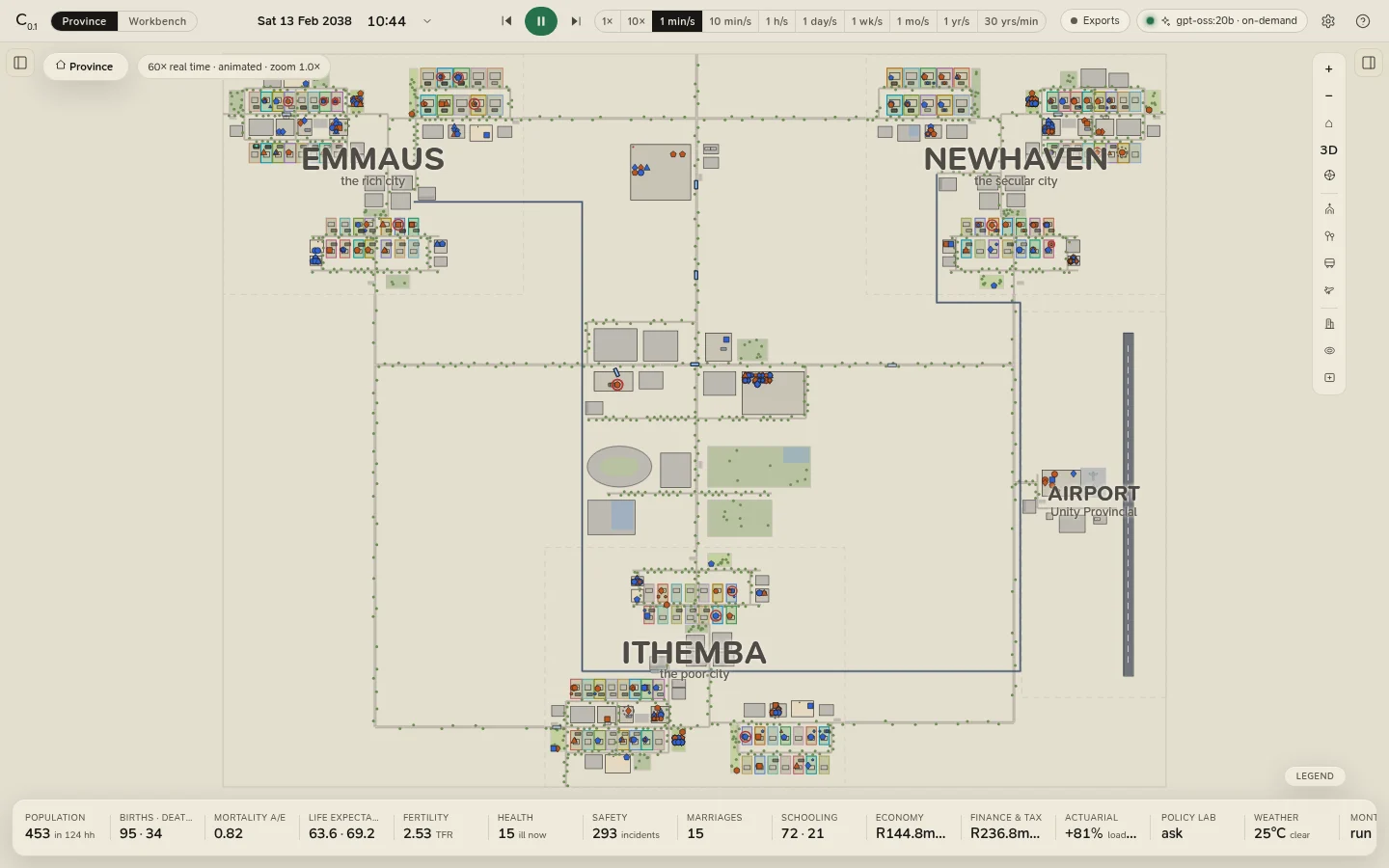
The screen at a glance
| Part | Where | What it does |
|---|---|---|
| Top bar | Along the top | The view switch, the clock, play and pause, the speed, the Exports chip, the model chip, Settings and Help. |
| Left panel | Left, closed at first; [ | Scenario & basis (the assumptions, and Rebuild province), the Households and People lists, and the Events ledger. |
| The map | The middle | The province: zoom from the whole of it down into a house, and past the rooms into the 3D close-up. |
| Inspector | Right, closed at first; ] | Whoever or whatever you selected: a person, a household, a building, a conversation. |
| Analytics strip | Along the bottom | Sixteen tiles of headline figures; each opens its part of the analytics drawer. |
Both side panels start closed so the province has the whole window. The buttons just under the top bar, at each panel's corner, open them, and the app remembers your choice. Selecting something does not open the inspector by itself: press ] once and it stays open.
The top bar
From left to right:
| Control | What it does |
|---|---|
| The C₀.₁ mark | The app and its version. |
| Province · Workbench | Switches views (Ctrl+1, Ctrl+2). |
| The clock | The date, the time and today's weather. Click it to set the scene: jump to a moment, a date or a season, or force the weather. A forced badge shows when the weather is forced. |
| Rewind | Rebuilds the province at day 0 on the same seed and basis. |
| Play / pause | Space. The province starts paused. |
| Step | Pauses and moves on one simulated hour. |
| Speed | From real time to a year a second; keys 1 to 0. A field beside it takes any number of simulated years a minute. See Time and the clock. |
| Exports | The province's data with its provenance, and importing a mortality table. Reads Exports · basis while the province lives on a table of your own or a stress. See Exports and data. |
| The model chip | The language model that scripts conversations, and the dialogue mode. Click it for Settings. Its light shows whether a model is ready, is writing, or cannot be reached. |
| Settings, Help | Settings (Ctrl+, in the desktop app) and the in-app help (?). |
What to read next
- Time and the clock: speeds, animated and time-lapse, jumping to moments, forcing the weather.
- The map: moving about, what every mark means, following people.
- People, households and places: the inspector.
- Conversations: watching them, having a model script them, talking to a resident.
- The 3D close-up.
- Scenario and basis: changing the assumptions and rebuilding the province.